
Best Practices for Modernizing Vintage Data Centers
Eaton · John Collins
Eaton guidance for upgrading data centers ten or more years old. Its most reused content is a table of typical MEP service lives and an eight-step retrofit process.
On this page
Overview
The guide starts from the observation that facilities ten or more years old fall behind on capacity, efficiency and maintainability. Modernisation is presented as a chance to replace failure-prone, undersized infrastructure while also improving arc-flash safety. The document is hosted on the LBNL Center of Expertise site and is Eaton white paper WP083014EN from 2016.
The most valuable content is the service-life table (Table 1). Rack PDUs last 8-12 years; power cables and busway 8-20 years; central UPS above 3,000 kVA 15-20 years, rackmount UPS 4-8 years, batteries 5-10 years depending on type; RPPs and computer-room PDUs 8-12 years; switchgear, transformers and generators over 20 years. The width of some ranges (8 to 20 for cables) shows how much environment and load change life.
The process has eight steps: it starts by assembling the team and building the business case, puts arc-flash hazard analysis at step five and commissioning tests at step seven, and ends with validation. Positioning arc-flash analysis as a required retrofit step matters: replacing existing switchgear also changes short-circuit levels and protection settings. The document is short and general: it gives no maintenance contract, capacity calculation or cost method, and the life ranges are one manufacturer's typical values. In lifecycle planning it is therefore useful for roughly timing replacement needs, not for fixing exact dates.
Key points
- Rack PDU 8-12 yr; power cables 8-20 yr; busway 8-20 yr
- Central UPS 3,000+ kVA 15-20 yr; rackmount UPS 4-8 yr; batteries 5-10 yr depending on type
- RPP and computer-room PDU 8-12 yr; switchgear, transformers, generators 20+ yr
- Retrofit process: 8 steps incl. arc-flash hazard analysis (step 5) and commissioning tests (step 7)
- Goal: more capacity and efficiency with better arc-flash safety and maintainability
- Hosted on the LBNL Center of Expertise site (Eaton WP083014EN, 2016)
Using it in design
- Add a designLifeYears catalog parameter per equipment type, default to the range midpoint, and drive a TCO/refresh timeline from it.
- In brownfield mode, require arc-flash study and commissioning tasks when the user upgrades existing switchgear or UPS.
- Plan battery replacement apart from the UPS frame: 5-10 years and a 15-20 year central UPS life are not on the same calendar.
- Show long-term replacement of switchgear, transformers and generators as its own line, assuming 20+ years of life.
Monthly newsletter · free
Keep your reading list current
Once a month: new library sources, changes to Turkish regulations and upcoming data centre events.
SoSo CAD
Review your power design in SoSo CAD
Inspect supply paths, equipment loads and UPS failure scenarios in one model.
Request a demo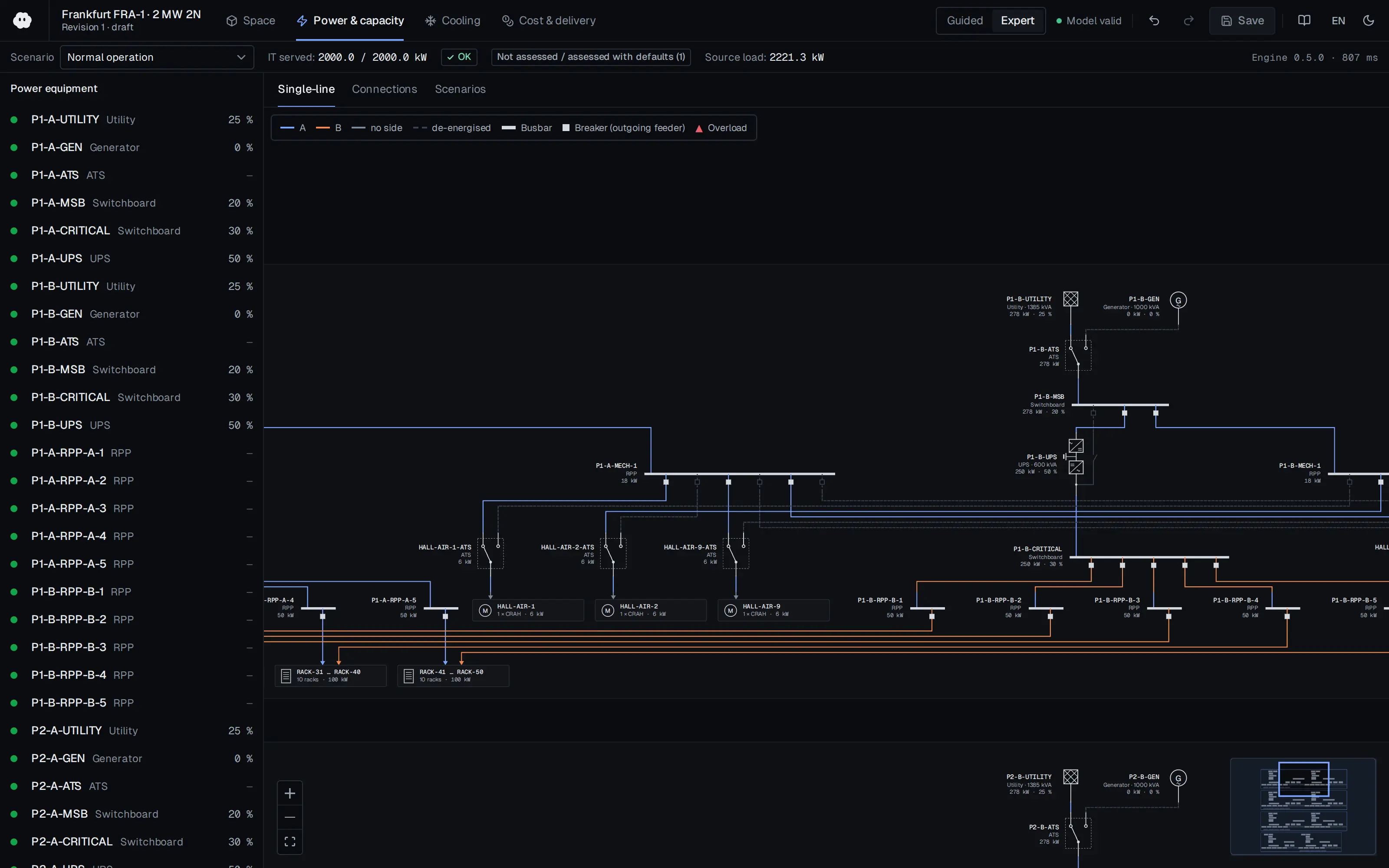
Who should read it
Facility managers and electrical engineers preparing the refresh budget and schedule of an existing data center.
Related standards
- NFPA 70E
- IEEE 1584
- ASHRAE Guideline 0 (commissioning)
Publication details
- Authors
- John Collins
- Publisher
- Eaton
- Year
- 2016
- Document number
- WP083014EN
- Document language
- English
- Source type
- Manufacturer
- Access
- Free to read
- Licence
- Copyright retained; citation only — the publisher’s terms apply to the original document
Citation
John Collins (2016). Best Practices for Modernizing Vintage Data Centers. Eaton. WP083014EN. https://datacenters.lbl.gov/sites/default/files/Best%20practices%20for%20modernizing%20vintage%20data%20centers.pdf
Events on this subject
Browse the events calendarAll content and rights belong to the respective authors and publishers. SoSo CAD provides only the citation, its own summary and a link to the source, and is not responsible for the sources' content.
Related sources
All sources on this topic
U.S. Army Corps of Engineers (Headquarters, Department of the Army) 2002
TM 5-693 Uninterruptible Power Supply System Selection, Installation, and Maintenance for Command, Control, Communications, Computer, Intelligence, Surveillance, and Reconnaissance (C4ISR) Facilities (31 May 2002)
Calculate availability from MTBF and MTTR before choosing a UPS configuration; apply the same method to single-unit, N+1 and dual-redundant layouts to compare the gain from redundancy with the cost of the added components.
- C4ISR facilities require a reliability level of 99.9999 percent (the six-nine rule), which may call for greater redundancy.
Huawei Digital Power 2022
Data Center PowerPOD 3.0 Technology White Paper
Add a 'prefabricated power train' block type (transformer, LV, UPS, feeders) carrying footprint, weight and a clearance envelope.
- Average rack power rose from 4 kW to 6-8 kW and is heading to 12-16 kW.
U.S. Army Corps of Engineers (Headquarters, Department of the Army) 2006
TM 5-698-4 Failure Modes, Effects and Criticality Analyses (FMECA) for Command, Control, Communications, Computer, Intelligence, Surveillance, and Reconnaissance (C4ISR) Facilities (29 September 2006)
At design stage run a functional FMEA of each critical system (power, generators, cooling); do not start without schematics, bill of materials, block diagram and the mission requirement.
- The Risk Priority Number is Severity (1-10) x Occurrence (1-10), optionally multiplied by Detection: RPN = S x O x D.
Uptime Institute 2026
Uptime Institute Annual Outage Analysis 2026 (8th annual) — press release (with 2025 findings)
Weight UPS, ATS/STS and generator failure modes highest in the reliability model
- About 1 in 10 outages has serious or severe impact
Socomec 2024
Data centre - How to ensure power availability, electrical safety and energy performance? (Expert advice & innovative solutions guide)
In the single-line editor, tag transfer devices as ATSE (IEC 60947-6-1) or STS with a transfer-time field, and suggest STS where the load needs under about 10 ms.
- Human error accounts for 22 % of unplanned outages.
Eaton 2025
Data Center as a Good Grid Citizen
Add grid-code parameters to the utility connection object: UFLS stages, LVRT curve, post-fault power recovery ramp (%/s) and short-circuit ratio at the PCC.
- Typical BESS Li-ion cells are limited to about 1C discharge.